


Top-Rated Security Keys: A Deep Dive into Hardware Authentication


In an era where digital threats are increasingly sophisticated, traditional passwords and even SMS-based two-factor authentication (2FA) are no longer sufficient to protect sensitive accounts. Cybercriminals have developed advanced phishing techniques and SIM-swapping attacks that can bypass these older security measures. This has led to the rise of hardware security keys, which provide the strongest possible protection for your online identity. These physical devices, often no larger than a standard USB drive, use public-key cryptography to verify your identity, ensuring that only the person holding the physical key can access the account.
The industry has moved toward Passkeys, a standard based on FIDO2 and WebAuthn that aims to replace passwords entirely. Hardware security keys have adapted to this shift, offering increased storage for resident credentials and broader compatibility across devices. Whether you are a casual user looking to secure your social media or an enterprise professional protecting critical infrastructure, choosing the right security key is a vital decision for your digital safety.
Why Hardware Security Keys are Essential
Hardware security keys offer a level of protection that software-based methods cannot match. Unlike an authenticator app on your phone, a security key is a dedicated device with a secure element designed to resist tampering. When you log in to a service, the key performs a cryptographic handshake with the server. This process is inherently resistant to phishing because the key will only respond to the legitimate website it was registered with, preventing attackers from intercepting your credentials on a fake site.
Feature | SMS/Email 2FA | Authenticator Apps | Hardware Security Keys |
Phishing Resistance | Low | Medium | High |
Ease of Use | High | Medium | High (Tap/Plug) |
Offline Access | No | Yes | Yes |
Device Dependency | Phone/Network | Phone | Independent Device |
Security Level | Basic | Advanced | Maximum |
Top Recommendations for 2026
Selecting the "best" security key depends on your specific needs, the devices you use, and the types of accounts you want to protect. Below are the top-rated options currently available on the market, each excelling in different categories.
1. The All-Rounder: Yubico YubiKey 5C NFC
The YubiKey 5C NFC remains the gold standard for hardware security. Its versatility is unmatched, supporting a wide array of protocols including FIDO2, U2F, Smart Card (PIV), OpenPGP, and various One-Time Password (OTP) formats. This makes it ideal for users who need to secure both modern web services and legacy enterprise systems.

The "NFC" in its name stands for Near Field Communication, allowing you to authenticate on mobile devices simply by tapping the key against the back of your phone. Its USB-C connector ensures compatibility with almost all modern laptops and tablets. Built to last, the YubiKey 5C NFC is IP68 rated for water and dust resistance and is virtually indestructible under normal use. While it only stores up to 25 passkeys, its support for other protocols like HMAC-SHA1 and TOTP makes it a powerhouse for advanced users.
2. The Passkey Specialist: Google Titan Security Key
For users who are deeply integrated into the Google ecosystem or those who prioritize passkey storage above all else, the Google Titan Security Key is the premier choice. In 2026, Google updated the Titan line to focus heavily on the transition to a passwordless future.

The standout feature of the latest Titan key is its massive storage capacity. While most competitors are limited to 25 or 50 resident credentials, the Titan key can store up to 250 passkeys. This makes it the perfect "one-key-fits-all" solution for users with hundreds of accounts. It supports FIDO2 and U2F and comes in both USB-C and USB-A variants, both featuring NFC for mobile compatibility. It is a streamlined, highly secure device that excels at its primary mission: providing a simple and robust passkey experience.
3. The Best Value: Yubico Security Key C NFC
If you don't need the advanced enterprise features of the YubiKey 5 series—such as PIV or specialized OTP protocols—the Yubico Security Key C NFC (often referred to as the "Blue Key") offers the best bang for your buck.

This key focuses strictly on the FIDO2 and U2F standards, which are the protocols used by major services like Google, Microsoft, Facebook, and Twitter. It features the same rugged build quality and NFC capabilities as its more expensive siblings but at a significantly lower price point. For the average consumer looking to step up their security without breaking the bank, this is the most logical starting point.
4. The Privacy Advocate's Choice: OnlyKey Duo
For those who demand the highest level of privacy and control, the OnlyKey Duo offers features that no other mainstream key provides. Unlike other keys that rely on the host computer's operating system to manage PIN entry, the OnlyKey Duo features physical buttons on the device itself.
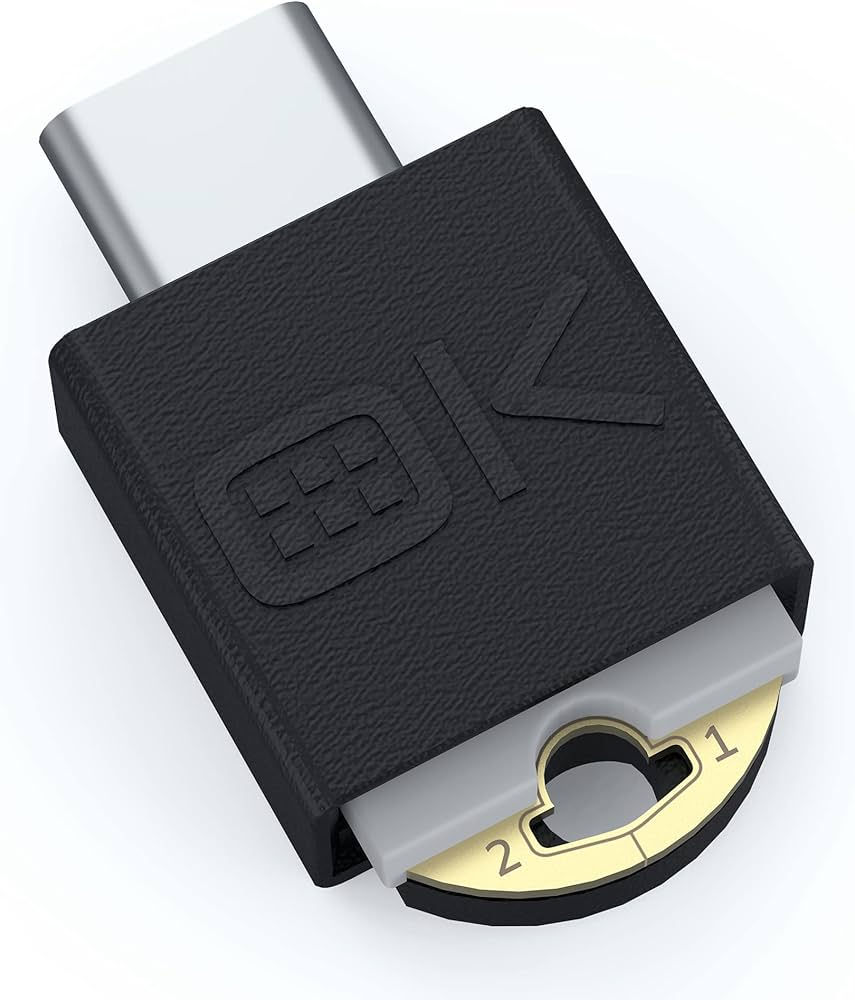
This "on-device" PIN entry means that even if your computer is compromised by a keylogger, your PIN remains safe. Furthermore, the OnlyKey Duo acts as a hardware password manager, capable of typing in complex passwords for sites that do not yet support MFA. It features dual connectors (USB-A and USB-C) and supports a wide range of protocols, including SSH and OpenPGP, making it a favorite among developers and security professionals.
How to Choose the Right Key for You
When evaluating which security key to purchase, consider the following factors to ensure you get the device that best fits your workflow:
Connector Type: Look at the ports on your primary devices. Most modern laptops use USB-C, but if you have an older desktop, you might need a USB-A key or an adapter.
Mobile Compatibility: If you frequently log in to accounts on your smartphone, ensure the key has NFC or a connector that fits your phone (like USB-C for modern iPhones and Androids).
Protocol Support: Do you need to log in to a corporate VPN or use a smart card for digital signatures? If so, you'll need a multi-protocol key like the YubiKey 5 series. If you only care about websites, a FIDO-only key is sufficient.
Biometrics vs. PIN: Some keys, like the Kensington VeriMark, offer fingerprint sensors. This adds convenience but can sometimes be less reliable than a physical tap or a PIN, depending on the environment.
"The best security key is the one you actually carry with you. Portability and durability are just as important as the underlying cryptography."
Setting Up and Best Practices
Once you have purchased your security key, the setup process is generally straightforward. Most major services have a "Security" or "Two-Factor Authentication" section in their settings where you can "Add a Security Key." You will be prompted to insert the key and touch the gold sensor to register it.
Crucially, you should always have a backup plan. If you lose your only security key, you could be locked out of your accounts. Most experts recommend buying two keys: register both with your important accounts, use one as your primary key on your keychain, and keep the second one in a safe place at home. Alternatively, ensure you have saved the "recovery codes" provided by the service during the setup process.
The Future of Authentication
As we move further into 2026, the reliance on physical security keys will only grow. We are seeing more "Passkey-only" account options where passwords are not even an option. This shift significantly reduces the attack surface for hackers, as there is no password to steal or guess. Hardware keys are the physical anchors of this new security model, providing a "something you have" factor that is nearly impossible to replicate.
In summary, although the upfront cost of a hardware security key may appear to be an additional expense, the security it offers is priceless. Opting for the versatile YubiKey 5C NFC, the high-capacity Google Titan, or the affordable Security Key C NFC means you are making the most effective move to protect your digital life from current and future threats.
Comments